Watch your catalog, anywhere
Bring rich movie and series metadata, multi-source ratings, full cast profiles, and one-click playlist playback with you across every webpage.
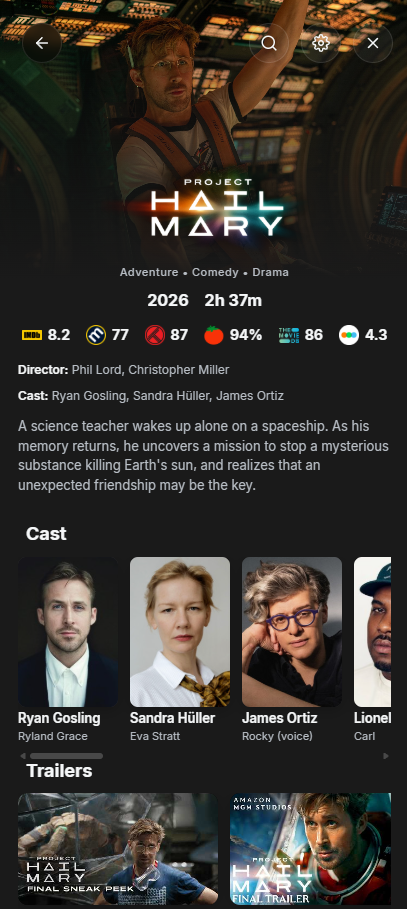
Your catalog follows you
Access rich movie and series breakdowns right on your screen. Whether you're browsing entertainment portals or any webpage, Bous opens instantly via the toolbar.
Unified Multi-Ratings
Never second-guess what to watch. View critic and audience ratings from top cinema and television databases unified into one clean, scannable rating strip.
Direct Player Playback
Export any selected title or stream directly as a standard XSPF playlist file. Bous automatically launches it inside your preferred local media player like VLC.
Built for true entertainment lovers
Every detail designed with clean typography, dark-mode elegance, and zero visual clutter.
Navigate seasons & episodes seamlessly
Jump directly between seasons and inspect full episode cards complete with runtime info, air dates, summaries, and individual episode ratings right inside the sidebar.
- High-resolution episode thumbnails
- Instant season switching tabs
- Cast and crew profiles right below
100% Local. Zero Tracking.
Unlike other browser companions that collect browsing habits and telemetry, Bous is built to respect your digital footprint from day one.
- No external tracking servers
- All preferences stored in local sandbox
- Transparent open-source architecture
No Telemetry Transmitted
Everything runs directly between your browser and public metadata endpoints.
Frequently Asked Questions
Is Bous completely free to use?
Yes! Bous is 100% free with no ads, no subscriptions, and no paywalled features.
How does the VLC / external media player export work?
When you select a stream or title, Bous creates a standard XSPF playlist file right in memory and hands it off to your browser's default media player using the downloads.open permission.
Does Bous collect my browsing history?
Absolutely not. Bous operates locally inside your browser (`chrome.storage.local`) and only fetches metadata when you actively interact with the extension sidebar.
How do I install the extension?
Click the "Add to Chrome" button at the top of this page to visit the official Chrome Web Store listing, then click "Add to Chrome" to install it instantly.